
How to make presentations with AI the right way
I have been building client proposals for thirteen years. Here is the workflow I use to make an effective presentation with AI without ending up with generic slides.
Work the content before the design. Give the AI your goal, audience, key message and constraints, ask it to structure the deck with a framework like SCQA, then iterate on that outline until the argument flows. Only then generate slides with your preferred templates or your brand guidelines. The text carries most of the result; design is delivery.
People just prompt the AI, get some results, and call it a presentation. I have a guiding principle: whatever high-stakes task you delegate to AI, you need to be mindful, and you need to use judgment and proper technique in what you do.
My theory here is twofold. First the craft, which is how you make an effective presentation if you forget about AI entirely, then the machine (AI, here), which reads what you already have, synthesises messy data, and gets you there fast. That order matters more than the tool you pick.
What does "the right way" mean when the AI can already make slides?
It means asking the core presentation question before the AI question. Let's forget about tools and AI for a second and ask: how do you make a good presentation?
There are two components. There is the content component, and there is the design component. Content is what goes on each slide, and it depends on what the deck is for. Is this a presentation you're using to pitch directly, or is this something you're sending by email so people can read it and get updates on what's happening in the business, like a weekly business review? Design is how that content gets delivered, in the most digestible and professional way possible.
Once the craft is clear, the AI has something to work with. It reads the documents you have, retrieves from your emails or your Excel files, the data you have, your transcript from the meetings you did, and generates slides that follow the rules you set. My rough estimate from doing this repeatedly is that you land around 80-90% there, with a few modifications left to make by hand.
The deck I built while recording this came out at 28 slides, 13 of them the main slides of the proposal, for an illustrative e-commerce brand I called Nova Mart.
Let's go through the steps now.
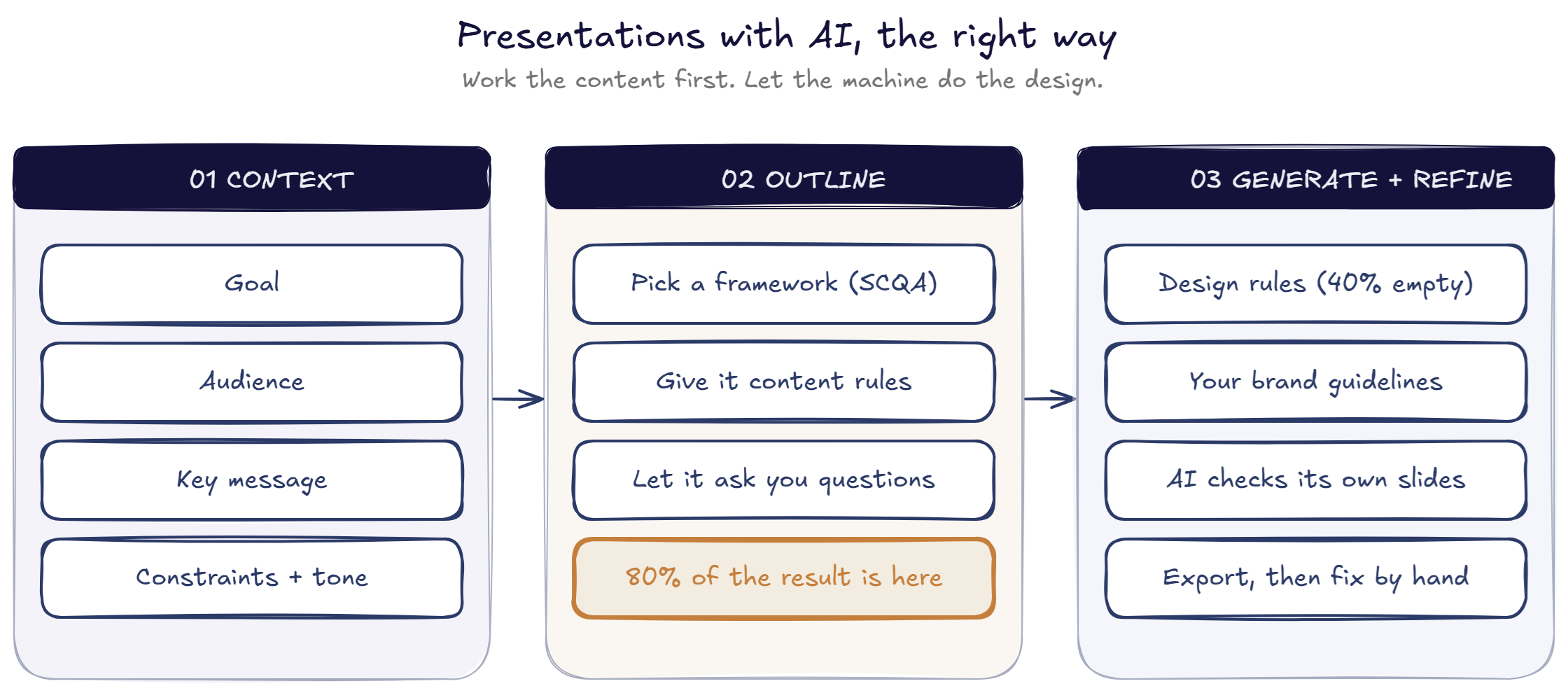
Step 1: what context does the AI need before it writes anything?
Context is king here. Before any prompt, write down four things:
- The goal. What's the goal of your presentation?
- The audience. Who are you presenting to?
- The key message. The one thing they should leave with.
- The constraints and the tone. What are your specific constraints, and what tone do you want the presentation to have?
The raw material for this is whatever you already have. Any information you gathered during your first meeting, or from searching online. The more, the better. If it's a company you don't know much about, you can ask the AI to search for the people, insights about the company, about their performance, and their potential problems when you benchmark them against competitors.
Put all of it in one document. That document is what the next step runs on.
Step 2: how do you build the outline?
You give the AI the context, you pick a structure, and you give it content rules. Nothing more complicated than that.
For the structure, I used SCQA here, which is a widely used framework among top consulting firms. McKinsey, for example, uses the SCQA framework. It is not the only option:
| Framework | How it orders the argument | Good for |
|---|---|---|
| SCQA | Situation, Complication, Question, Answer | Proposals and recommendations, where you need the client to arrive at your answer |
| Storytelling | Setup, tension, resolution | Vision decks, internal buy-in, anything that needs emotional pull |
| Pyramid principle | Answer first, then supporting arguments, then detail | Executive updates and readouts where the reader may stop after one slide |
Then add the content rules to the prompt. Keep it simple, and add rules progressively. These are backed by presentation best practices, and here are the ones I give it:
- One idea per slide, with
3-4supporting arguments. Otherwise, people will just disconnect. - Numbers with verified sources for any claims.
This is very simple stuff, but the principle is the same, whatever rules you add.
The last thing in the prompt is the most useful: ask the AI to ask you five questions that would make this presentation better. In my case, it asked what a number meant, what "cost reduction" referred to, and what proof we could actually state from our old use cases at Turalabs, my AI implementation agency.
What comes back is an outline with the slides at a glance. You can read the slide titles, see the arguments, and check whether it flows logically without reading into the details.
Why does the outline deserve two or three rounds before you touch design?
Go over the text of the presentation as many times as needed. The information needs to flow correctly, especially for an important presentation.
In my test case, the second version came from adding more context about the client. The third came from asking for outside proof online and return-on-investment figures to back my claims - I always benchmark against what's realistically possible, to manage expectations.
Stay in this step as long as you need. Here you build your flow, and this is the most important part. Don't jump into making the design without having a proper flow and proper data. Work on the text and the content first, because in my experience that is where most of your result comes from, and the delivery is just the design.
Once you finish editing, give it back to the AI assistant - Claude, ChatGPT, or whichever you use. Now you're ready for the next step.
Step 3: how do you turn the outline into slides?
You give it design principles and your brand guidelines, then let it run. Simple rules are enough:
- Stay consistent within your colors.
- Leave roughly
40%empty space, so the idea lands at a glance. - Build visual hierarchy so the eye knows where to go first.
Add other rules of your own, and give it examples of past slides you found effective.
For brand guidelines - your colors, your fonts, the way you want slides to appear - give it what you already have. If you don't have a brand sheet or don't want to build one, two shortcuts work: give it examples of slides you made before, so it can reuse the same type of layout, or point it at reference screenshots of consulting-style slides and let it match the look. I like using slide references from SlideStart for this.
Then you let it run. It takes a few minutes. Enjoy your coffee.
Step 4: what do you fix at the end?
Small things, not structural ones. When I opened the generated deck, it respected the design guidelines and the layout was good. It's 80-90% there.
Export the slides to Google Slides. You can also download them as a PPT file, or put them in Canva, or any other presentation tool you like. I used Claude AI for this demo (Opus 5, thinking high).
What you end up with is a well-thought-out presentation made in a fraction of the time it used to take - not minutes, but far less than before - and more effective than what you were able to make on your own.
That is the whole point. In each thing you do with AI, you need to keep your judgment, and you need to merge the craft of the thing you are doing with what the AI is genuinely good at: retrieving the right information, structuring your thoughts, and handling the design.
The goal here is better-quality output, not higher-volume AI slop.
Frequently asked questions
Can AI make a good presentation on its own?
Not from a single prompt. AI produces slides quickly, but a deck only works when the goal, the audience and the argument are decided first. Give the AI that context and a structure to follow, and it handles the drafting and the design well. Skip it and you get generic slides.
What is the SCQA framework?
SCQA stands for Situation, Complication, Question, Answer. It is a way to order an argument so the reader follows you to the recommendation instead of being handed conclusions. Consulting firms use it heavily. You can also use a storytelling structure or the pyramid principle depending on the deck.
How much of a presentation is content versus design?
In my experience most of the result comes from the text and the argument, not the visuals. Design matters, but AI can now handle it well once you give it simple rules and your brand guidelines. So the time you have is better spent on the outline than on layout.
Should I trust the numbers AI puts in my slides?
No, verify them first. When you ask an AI to find supporting statistics it might return figures that look credible and cite sources that don't actually say what it claims. Check every number against the original source before it goes in a client deck. Your name is on the slide.
Do I need brand guidelines to generate slides with AI?
It helps, but it is not required. If you have a colour system, typography and icon rules, give them to the AI directly. If you do not, give it a few slides you made before so it copies the layout, or point it at a reference site for consulting-style decks.
What's next
The same split applies to most knowledge work you hand to AI: settle the craft, then bring in the machine.
If you want the prompts I used here, along with the other workflows I run week to week, grab the swipe file and subscribe to the newsletter.
Where AI actually fits: a five-step method, worked on export operations
NextAI in Sales: 16 Use Cases Ranked (Start With These 5)
Related articles
AI in Sales: 16 Use Cases Ranked (Start With These 5)
Salespeople spend only 25 to 44% of their time selling. Here is where AI fits in the B2B sales process, which five use cases to start with, and how to implement them step by step.
Where AI actually fits: a five-step method, worked on export operations
A repeatable way to find where AI belongs in a business: map the activity, size the pain with sourced numbers, match the work to the technology, then score the options on criteria you can argue with. Worked end to end on export.
AI in export operations: eighteen use cases, scored
Based on recent implementation, we inventoried forty tasks an exporter performs, cut them to eighteen AI candidates, and scored every one. Here is the full ranking, the reasoning behind the top and bottom scores, and what changes at a different company size.