
AI in Sales: 16 Use Cases Ranked (Start With These 5)
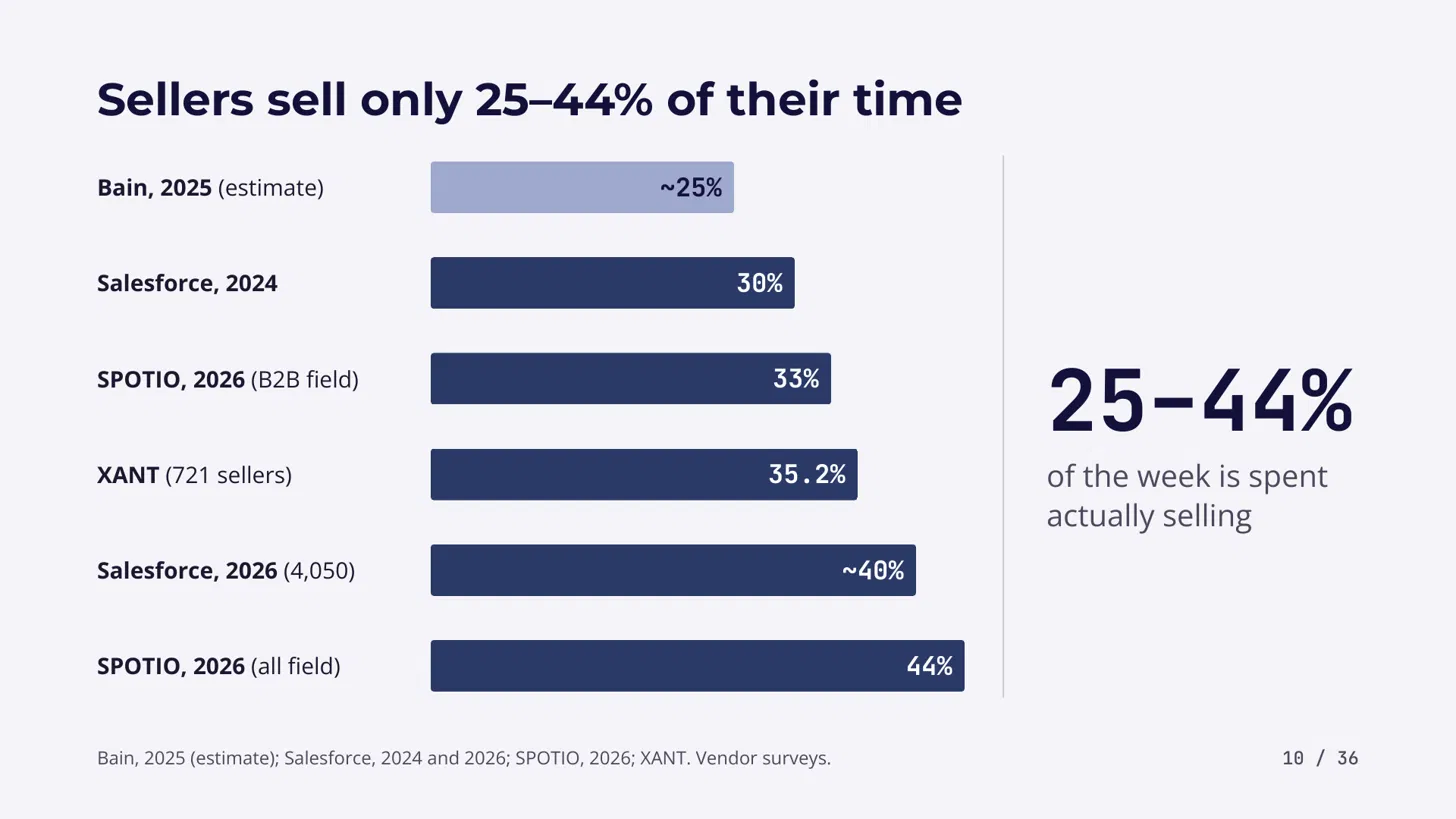
Salespeople spend only 25 to 44% of their time selling. Here is where AI fits in the B2B sales process, which five use cases to start with, and how to implement them step by step.
TLRD: Start with these five AI use cases in your B2B sales process: call notes to CRM, instant inbound response, scheduling and chasing, contact data hygiene and research briefs. They score highest on value and ease. Skip the fully autonomous AI SDR for now, pick one use case, one KPI and run a pilot of up to
90 days.
According to recent studies, the salesperson spends about 25-44% of their time only on selling, and the rest goes away to admin work and other stuff (the studies I compared range from about a quarter to under half, and Salesforce puts it under 30%). You know that AI can help you here, but you don't know where to actually start. There is a contrast I want to highlight: if you implement AI properly, you will be 3.7 times more likely to hit your sales quota, but if you get overwhelmed by the number of tools and technologies brought to you every day in your work, you are 45% less likely to hit it (Gartner, 2024). So it all depends on how you implement AI for you or your team and where to start, and the goal here is to identify the right use cases to start with, to gain clarity and to start step by step.
Mapping the process: How does a B2B sales process work?
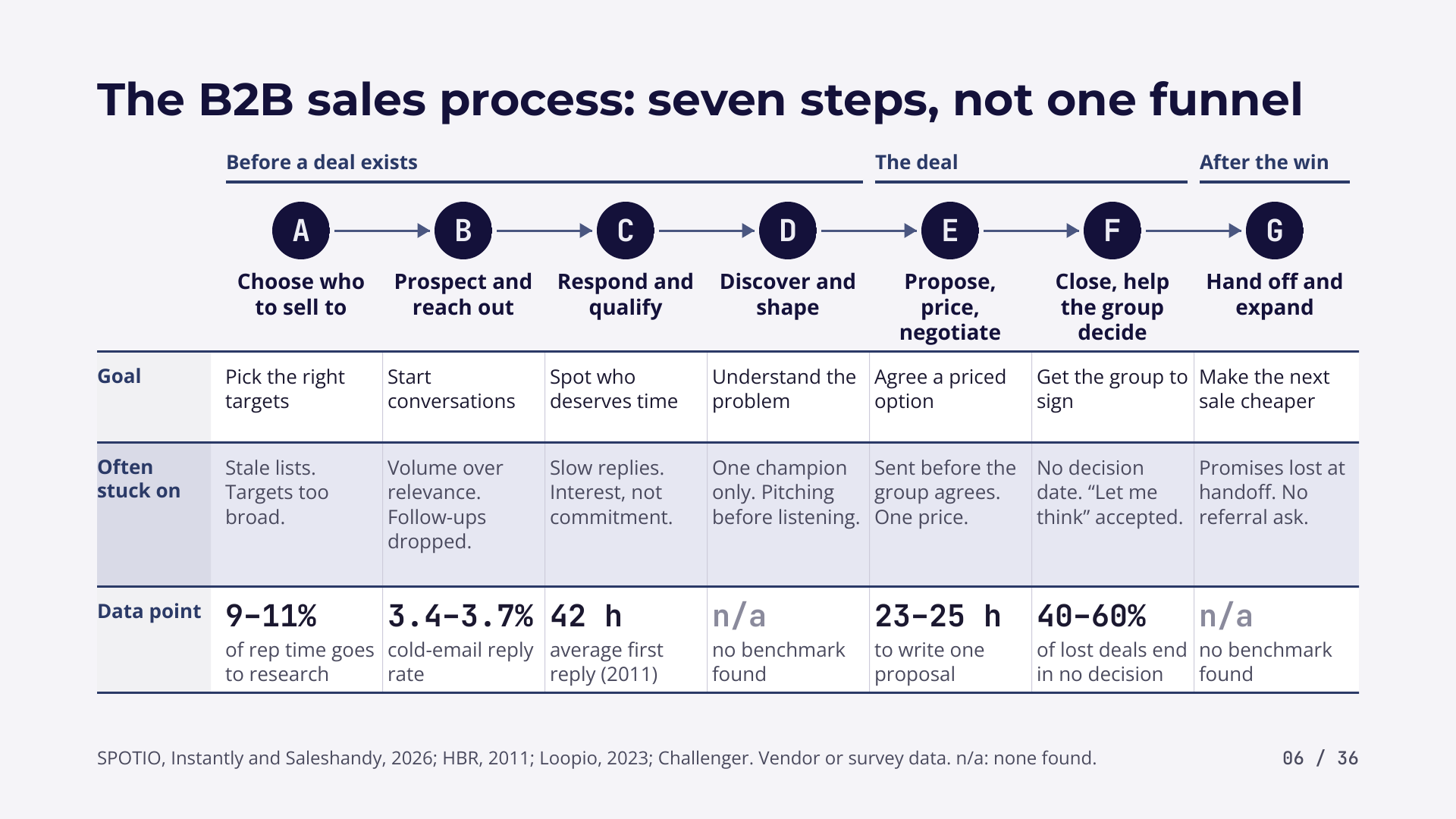
A B2B sales process runs through seven steps, with supporting layers underneath them. I start from first principles: the main chain of activities first, then the supporting layers.
- Choose who to sell to. The goal is to pick the right target.
- Prospect and reach out. You start reaching out to potential clients, the goal is to start the conversation and get it going, and here the volume is important.
- Respond and qualify. It's important to qualify the right buyer so you don't waste time with the wrong people, to reply fast, and to see if there is interest and commitment from the buyer.
- Discover and shape. You try to understand the problem of the client to help them choose the right solution from what you offer. You identify the champion, and you need to listen and understand instead of pitching.
- Propose, price and negotiate. You draft the deal, you propose, and you negotiate the price with the different stakeholders.
- Close, help the group decide. This is where a lot of projects stop and a lot of issues happen, because there are a lot of no decisions.
40-60%of lost deals are lost to no decision (Challenger). - Hand off and expand. After you win the deal, you need a proper handoff to the operational team to execute and implement for the client.
Besides the full process, the B2B sales process has supporting layers. The first is pipeline and CRM discipline: you log all the information about the deal in your CRM, for example Pipedrive or HubSpot. Then come forecasting and reporting, enablement and content (the content the sales team uses for pitching and discussion with the client), and data and list quality, because if someone moves or changes email or company, you need to be aware of that. Training and coaching helps junior and medium sellers upskill. The last layers are compensation and quota, legal and compliance, relationships and referrals (the people who can introduce you to customers, partners and alumni), and market and competitor watch, where you need to know who else the buyer is considering and what has changed with the other competitors.
How much of a salesperson's week can AI give back?
In my very conservative estimate, you can gain up to 20-30% of your sales team's time back using AI. This is my own estimate, not a measured result.
Take a week of your sales team. I compared many research data, six research studies, and they say sales teams spend between 25-44% of their time on selling. In my modelled week, the rest looks like this: 12% on the CRM and the call notes, 12% on prospect research, 10% on outreach drafting, 6% on proposals, 5% on meeting preparation, 4% on internal reporting and meetings, and 11% on everything else. These shares are aggregates based on multiple data points. AI can help a lot with the CRM and call notes, the prospect research, the first drafting of outreach and proposals, and the meeting preparation.
Which AI use cases fit the B2B sales process?
There are 16 AI use cases in B2B sales, and each one fits a step of the process or a supporting layer.
AI helps :
To choose who to sell to, it retrieves and does research briefs, finds the right prospects and classifies them.
For prospecting and outreach, AI does the first drafting and the salesperson edits and sends.
To respond and qualify, AI qualifies buyers based on your criteria, on previous wins and losses, and on the profiles of the people you talked to.
In discovery, it helps you prepare the first meeting, records the call notes and puts the data into the CRM.
For the proposal, price and negotiation, AI does the proposal and finds the right pricing, and the salesperson comes in, edits and sends it, which I estimate saves at least 60% of the time. At the close, AI does the reminders, the chasing and the follow-ups, so you don't have a no decision, which is the biggest risk.
After the close, it gathers the insights and does the proper handoff to the operational team.
In the support layers, AI registers the call notes in the CRM, tells you which deals are stale and flags them, retrieves the right use cases and content for the discussion with the client, and researches online, cleans and updates your data. For training and coaching, it gives a feedback loop on your sales calls or simulates the call so the junior SDR can train. For compensation and quota, and for legal and compliance, there is no specific use case for now. For relationships and referrals, AI identifies the people who can do a warm intro for your existing lead list. And for market and competitor watch, AI does very well on a schedule: you set the schedule and let AI do the research.
| # | Use case | What AI does |
|---|---|---|
| 1 | Call notes to CRM | Listens to your call, writes the summary and next steps, and updates the CRM |
| 2 | Inbound response | Flags an inbound lead, notifies you and can send the first reply, so you respond very quickly |
| 3 | Scheduling and chasing | Books the meeting, sends reminders and politely follows up until you get the first meeting |
| 4 | Contact data hygiene | Cleans up your data and updates it for you |
| 5 | Research briefs | Before the call, an AI agent does the research brief |
| 6 | Deal risk rules | Simple rules and automation flag when a deal goes stale and you need to follow up |
| 7 | Outreach drafting | Creates the first draft for email and LinkedIn, then you edit and send |
| 8 | Proposal drafting | Merges call notes and prospect data with your proposal template into a first proposal |
| 9 | Coaching and practice | Plays the buyer for role play, or gives feedback after a real sales call |
| 10 | Signal monitoring | Keeps track of what is happening out there |
| 11 | Win-loss synthesis | Learns from previous cases |
| 12 | Warm intro mapping | Finds who in your network knows someone at the target company |
| 13 | Handoff brief | Gathers the insights and information for the operational team after the deal |
| 14 | Content retrieval | Finds the right case study, slide and answer when you need it |
| 15 | Forecast assistant | Predicts what you will really close and flags over-optimistic deals |
| 16 | Autonomous AI SDR | Does the whole job of a junior SDR with no human step |
How do you rank the 16 AI use cases?
I ranked them with two general aspects (7 underlying metrics): is it worth it, and how easy is it to implement for you.
The first metric is value, with three criteria: revenue, efficiency in terms of time and cost saved, and whether it helps you do things better. For ease, I take into account the technical complexity of the implementation, the data (if you have enough data at your stage of company), whether it plugs into the tools you already use today or involves a lot of change and friction in your team, and team adoption: will people actually use it in day-to-day life? These scores are my judgment backed by the sources I found, not a lab measurement.
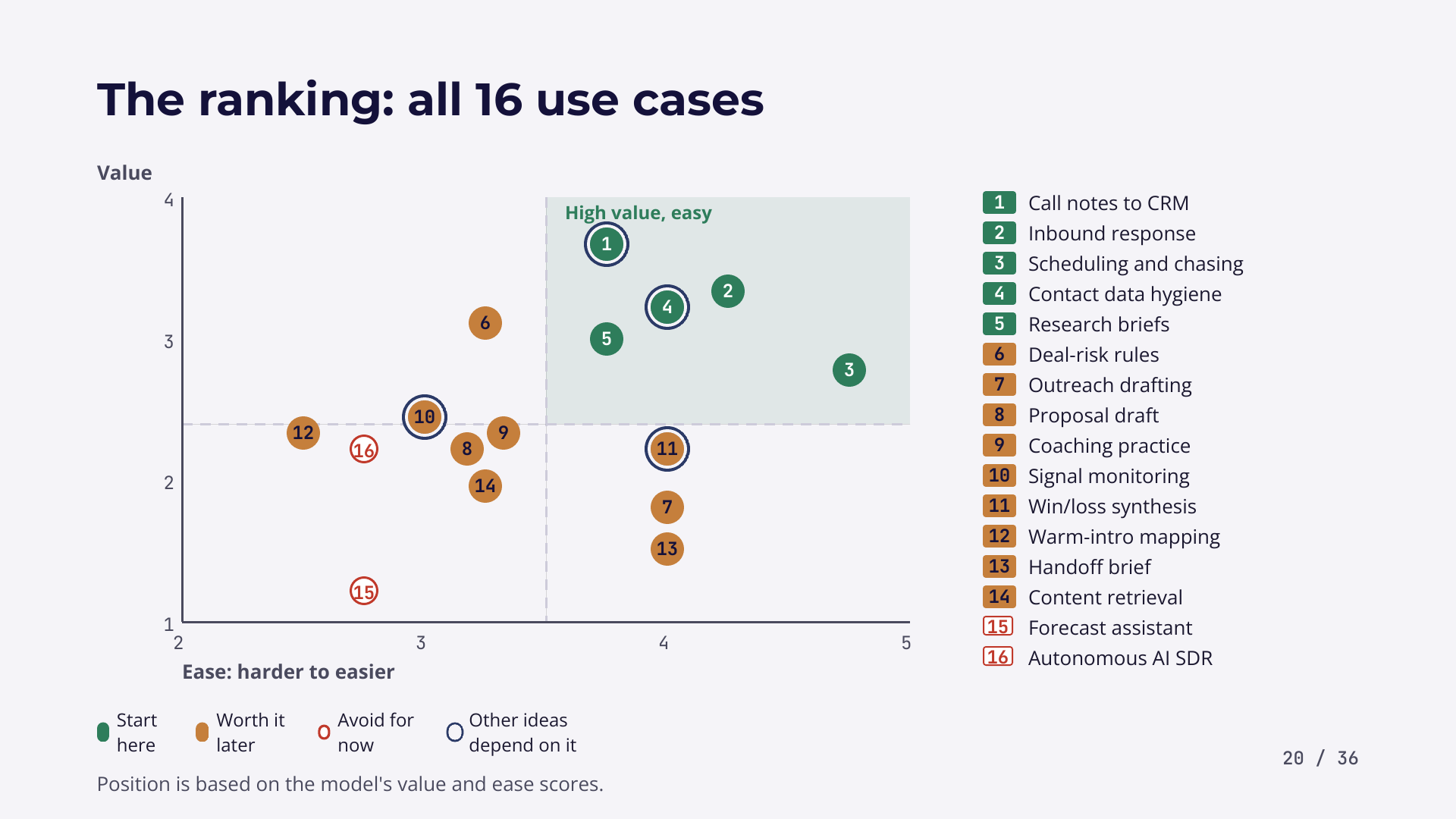
In the top right corner are the high value, easy to implement use cases: call notes to CRM, inbound response, scheduling and chasing, contact data hygiene and research briefs. Use cases 1, 4, 10 and 11 (call notes to CRM, data hygiene, signal monitoring and win-loss synthesis) are circled because they have a compound effect: when you do them right, other use cases can be empowered and you get more results from them. What you should absolutely avoid is a fully autonomous AI SDR, or focusing too much on the forecast assistant. My opinion is to start with the first five use cases and to implement use cases 9, 10 and 11 afterwards.
How do you implement the five AI use cases to start with?
Each of the five can be set up in a few days to a few weeks, often with tools you already pay for.
| Use case | How to implement it | Tools named | Setup time |
|---|---|---|---|
| Call notes to CRM | A meeting assistant transcribes the call, then an automation, or Claude or ChatGPT as the brain, converts it and logs it in the CRM after each meeting | Fathom, Google Meet, HubSpot, Claude, ChatGPT | A few days |
| Instant inbound response and routing | When a meeting is scheduled or a form is filled, an automation tells you to send a first response or call, or pings your team to call within the first 30 minutes, hour or day | n8n, Make | 1 to a few weeks |
| Scheduling and chasing | Book the meeting, chase the no replies, do the follow-ups and rebook the no shows with a short reminder draft | Calendly, HubSpot | A few days |
| Contact data hygiene and enrichment | Finds duplicates and dead emails and fills the gaps in your contact records, using an enrichment tool and your CRM | Apollo, Clay | A few days to 1-2 weeks |
| Account research briefs | A one-page brief on each target account with the source links | Clay, Perplexity | Not stated in the video |
Call notes to CRM is the easiest one, and you can start implementing it directly. It doesn't cost you a lot, and you can check whether it is just an upgrade in the cost of the tools you are already using. I estimate you will save around 2-4 hours a week per salesperson, and you have cleaner data about each of your prospects. You can replace the meeting tool or the CRM with whatever you have.
Instant inbound response matters because the quicker you respond to inbound leads, the higher your chances of getting the first conversion in the pipeline. The value here is the increased conversion of your clients, on top of the time saved.
Scheduling and chasing is mostly an automation, and you don't need a lot of AI here. You create the rules, the process of following up, and then you implement it with a simple automation.
Contact data hygiene and enrichment matters because around 30% of B2B contact data goes out of date every year (Dun & Bradstreet). Enrichment means you want more information about a prospect: what he did before, his business core activities, the last comments he put on LinkedIn. You pay mostly for the data, either on a subscription basis or per request.
Account research briefs help you arrive prepared, and it's better to send an outreach message that really understands the context of the client and his core pain points. You gain better calls and better chances of converting the client down the line, on top of the time saved.
Which other AI sales use cases are worth adding later?
Outreach drafting, proposal drafting, coaching practice, signal monitoring, warm intro mapping and the handoff brief are worth adding after the first five.
- Outreach drafting: this is not my preferred use case. It's better you edit the draft afterwards and send it, to put the human touch into it, because here we're talking about B2B deals.
- Proposal drafting: a step that saves a lot of time. There are companies who only offer request for proposal drafting and they are successful today. You turn the call notes and all the data about the prospect into a first reasonable proposal that you quickly edit and send. For scale, Loopio's 2024 report found teams spend about
30hours on each RFP response. - Coaching practice: you can use AI now to help your sales team develop quickly, and recent studies have shown this is very effective. AI plays the buyer role for a role play, or gives you feedback after an actual sales call. Use it instead of replacing your junior sales team.
- Handoff brief: AI is very good at gathering and summarizing data, and you don't need to have human language inside the text.
- Signal monitoring: AI is very good at researching data online and keeping track of what is happening, so you don't waste time doing it yourself.
- Warm intro mapping: something simple you can do today with AI. It takes a lot of time by hand, but it can lead to potential big deals just by using the warm intro.
Why should you avoid a fully autonomous AI SDR?
A fully autonomous AI SDR does the whole job of a junior SDR, and it has not worked well. Lots of companies have been trying to give you this fully autonomous AI agent product: it does the finding, the cleaning, the research, the writing, the sending and the reply, until the first call is booked, and then a more senior salesperson starts that call.
This has not worked well and it creates distrust within prospects, according to multiple studies. For example, Gartner published research titled "Stop Replacing SDRs With AI" in July 2026. What is more effective is to start step by step and use AI where it actually makes sense: signal monitoring first, then contact data hygiene, research briefs, warm intro mapping, outreach drafting with a human editing afterwards, and then scheduling and chasing, because you don't need to remember it yourself. This is much more efficient, you don't need to replace the full process, and I estimate you save at least 50% of the junior SDR's time.
Should you buy, connect or build your AI sales tools?
In most cases you should buy or connect, not build. There are three ways to implement, and you should stick with the first or the second.
- Buy. This is the most common. You buy a feature that is already within the tools you use (HubSpot has AI features that match the use cases above), or a specialized third-party tool that does one or several of these use cases and plugs into your existing CRM or tools.
- Hybrid. You use different tools you purchase or already have, and connect them with an automation tool like Make, n8n or Zapier.
- Build custom from scratch. An AI agent built only for your company. This can be relevant where you have compliance needs, where you want to own the data and have zero risk of data leakage.
What I would always recommend is to customize whatever you are using to the actual workflow you have: reimagine the workflow and think about it before you start implementing. It's more important to have the right process, with the people agreeing on it, than to use the right tool only.
To decide, use this framework and stop at the first yes:
- Does a tool you already pay for do it? If yes, start there.
- Does a specialist tool plug into your tools, like a plugin you can add? If yes, start there too.
- Can you link your tools with a simple automation, like n8n, Zapier or Make?
- Is it unique enough, and does it bring enough value for your team, to be worth building something fully custom?
- If not, skip the use case for now and implement other use cases to get the ball rolling.
![Decision tree for implementing an AI use case: use a tool you already pay for, buy a specialist tool, connect tools with automation, build custom, or skip it for now] (https://jozrukzfuhlpveytvrsl.supabase.co/storage/v1/object/public/blog-images/ai-use-cases-b2b-sales/image-mvaklcqc.png)
Does the ranking change by sector and company size?
Yes. These use cases are scored on an average basis, and depending on the type of business or sector you have, the ranking and the priorities are different.
For example, SaaS and B2B e-commerce and wholesale don't have the same ranking. For the luxury and premium sector, you don't need to do the outreach with AI: you need to have the relationship and to be close with the client yourself directly. But you can do the research briefs and the call notes using AI. Depending on the growth stage, you also need to focus on different things. Call notes, scheduling and research briefs are more important for solo founders and very small businesses, whereas for bigger companies the quick inbound response, the call notes and contact data hygiene matter more, because you have a very big list of prospects, higher volumes. You can find the full table in the free report linked at the end of this article.
![Table of the top three AI use cases by sector and company size, from solo founders to mid-market teams] (https://jozrukzfuhlpveytvrsl.supabase.co/storage/v1/object/public/blog-images/ai-use-cases-b2b-sales/image-mvakmxn5.png)
How do you start with AI in your sales process?
Start with only one use case. Once you decide which tool and which use case to use, this is how to start:
- Identify the core KPI of the use case, so you can see if it is actually successful or not.
- Pilot it for up to
90 days. It can be less, depending on the use case. - Set a go or no-go decision: how do you decide if you keep using the AI solution or not?
- Consider whatever it replaces, or the process it changes.
Keep in mind that the training of your team, the people and process part, comes before the tool part. What matters about the tool implementation is the change management around it and the process reimagining you do for your team, more than the complexity of the tool itself.
Frequently asked questions
What are the best AI use cases for B2B sales?
Start with call notes to CRM, instant inbound response, scheduling and chasing, contact data hygiene and research briefs. These five score highest on value and ease, and most can be set up in a few days to a few weeks. Add coaching practice, signal monitoring and win-loss synthesis afterwards, once the first five run well.
Should a B2B sales team use an autonomous AI SDR?
No, not for now. In theory, a fully autonomous AI SDR does the whole job of a junior SDR, from finding prospects to replying, and studies point to distrust among prospects. Gartner published research titled Stop Replacing SDRs With AI. Using AI step by step works better, with a human editing outreach before it goes out.
How do you implement AI in a B2B sales team?
Check in order: a tool you already pay for, a specialist tool that plugs into your tools, a simple automation with n8n, Zapier or Make, and only then a custom build. Stop at the first yes. Before choosing the tool, reimagine the workflow and train the team, because the process matters more than the tool.
How long should an AI sales pilot last?
Pilot one use case for up to 90 days, or less depending on the use case. Define the core KPI before you start and set a go or no-go decision on whether to keep the solution. Consider which process the AI replaces or changes, and train your team before you focus on the tool.
How much time can AI give back to a sales team?
In my estimate, up to 20 to 30% of a sales team's time. Studies find salespeople spend only 25 to 44% of their time selling, and the rest goes to admin work such as CRM entry, prospect research, outreach drafting, proposals and meeting preparation.
What's next
To go further, subscribe to the newsletter "Where AI Really Fits" and download the free report with the full scoring, the sector and company size table and all the resources.
If you want help finding where AI fits in your own sales process, book an advisory session with me.
Related articles
How to make presentations with AI the right way
I have been building client proposals for thirteen years. Here is the workflow I use to make an effective presentation with AI without ending up with generic slides.
Where AI actually fits: a five-step method, worked on export operations
A repeatable way to find where AI belongs in a business: map the activity, size the pain with sourced numbers, match the work to the technology, then score the options on criteria you can argue with. Worked end to end on export.
AI in export operations: eighteen use cases, scored
Based on recent implementation, we inventoried forty tasks an exporter performs, cut them to eighteen AI candidates, and scored every one. Here is the full ranking, the reasoning behind the top and bottom scores, and what changes at a different company size.